CC-Copilot




A copilot for AI coding agents.
GitHub Copilot made codebases easier to read.
CC-Copilot makes agent runtimes easier to follow.
Modern coding agents don’t just autocomplete code anymore. They plan, edit,
test, fail, retry, and continue for hours across Claude Code, Codex, and
multi-session workflows. That creates a new developer problem: not just
understanding the codebase — understanding what your agents have been doing
over time.
CC-Copilot is a separate supervision layer for that work, read-only by
default. Its primary interface is the cockpit, a terminal-native TUI for
live agent supervision: shared context, grounded questions, risk signals, and
next decisions. Ask across one session, selected sessions, or an entire
project — without injecting supervision chatter into the main Claude Code or
Codex workflow.
Read-only is how cc-copilot manifests under its current requirements, not a
hard restriction baked into the design: the narrator that powers recaps, chat,
since, /goal, and /loop is confined to read-only by default and can be
opted out of that confinement (see Read-Only by Default).
The working agent stays focused. You stay aligned.

Above: coming back to an agent session — the /since re-entry recap of what
happened while you were away, a streamed citation-pinned answer to “is it safe
to merge?”, and the two-level model picker.
Quick Start
cc-copilot
Or start your agent and the cockpit together, side by side (tmux):
cc-copilot launch
cc-copilot launch codex
cc-copilot launch -- claude --resume
launch splits the window (or creates a tmux session and attaches), starts the
agent, and the cockpit waits for that agent’s session to appear and pins itself
to it. No tmux? It tells you and opens the cockpit alone.
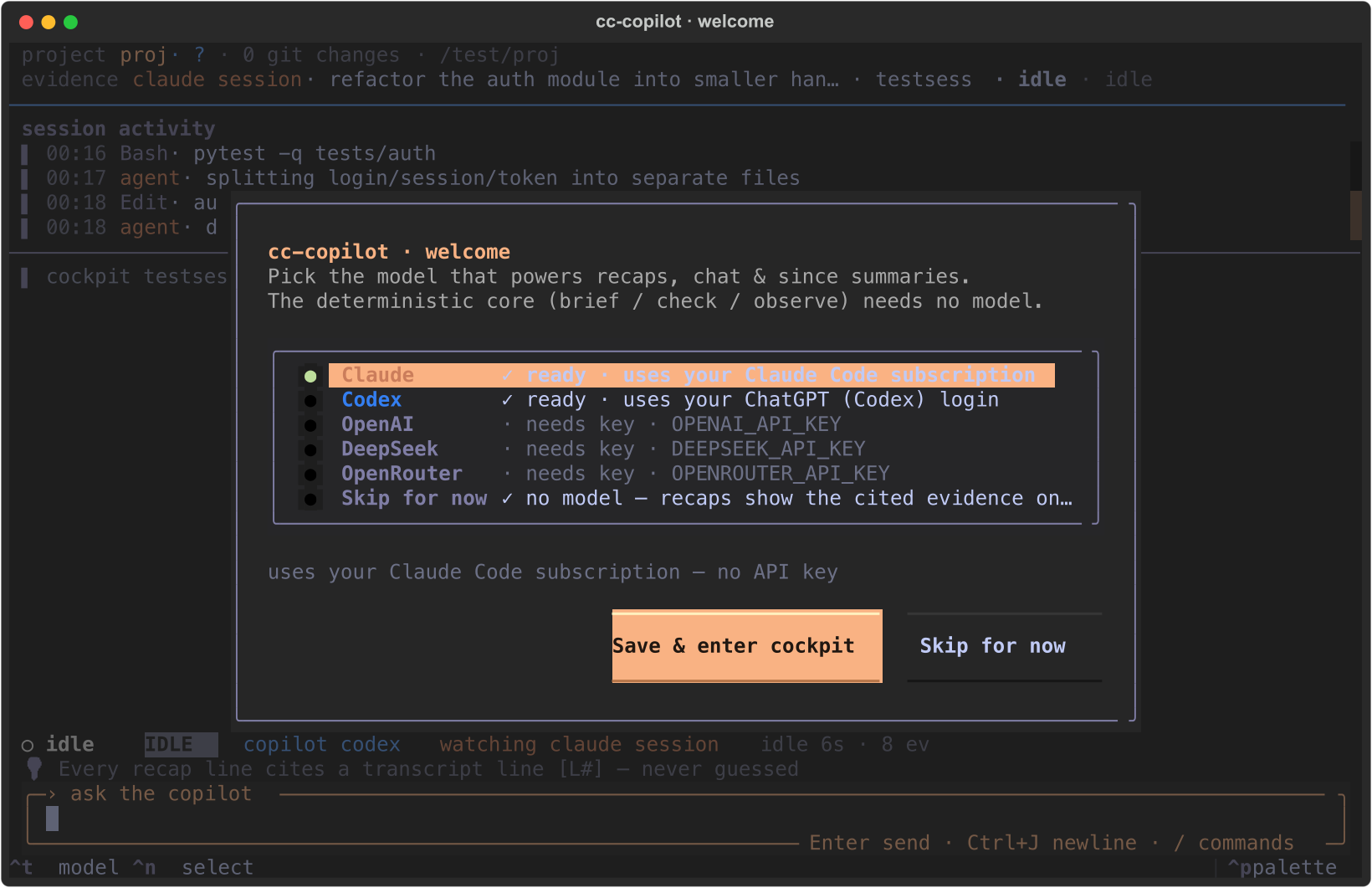
The first launch greets you with a one-time welcome screen to pick the model
that powers recaps, chat, and since — Claude or Codex (uses the
agent’s own login, no API key) or an API provider (OpenAI / DeepSeek /
OpenRouter, key captured inline). It only shows once; reopen it anytime with
/init, or run cc-copilot init in a plain terminal (handy over SSH). The
deterministic core (brief / check / observe) needs no model at all.
Inside the cockpit:
/sessions   choose one or more agent sessions (incl. your own live session)
/here       observe the session you're running inside of
@session    scope the next answers to the current session
@sessions   open the session picker for selected-session evidence
@project    scope answers to project evidence
@release    load a saved scope group (created with `/scope save release`)
/target     show the current cockpit target (id, evidence session, scope)
/status     fleet board — every session in this project, neediest first
/watch      core observer loop; `/watch 中文` steers output; `/watch view` monitor
/observe    attention queue and next human decision
/now        recommend the next step from the completed work (LLM; deterministic fallback)
/goal       draft a paste-ready agent /goal from agent + project context
/loop       draft a paste-ready agent /loop from agent + project context
/since      cited delta since you last looked (or 30m / 2h / 1d; --recap = LLM)
/handoff    shareable Markdown handoff (brief + what changed)
/brief      deterministic recap with citations
/check      safety / off-track verdict
/diff       changes since last turn
/model      choose backend/model
/init       reopen the model picker (Claude / Codex / an API key)
/resume     browse & resume a cockpit session
Install
One command, no clone — install it as an isolated tool:
uv tool install "cc-copilot[tui]"
pipx install "cc-copilot[tui]"
Then:
cc-copilot
Or run it without installing anything:
uvx --from "cc-copilot[tui]" cc-copilot cockpit
Requirements: Python 3.9+. The CLI core is dependency-free; the cockpit TUI
pulls in the optional [tui] extra (Textual) — drop it (cc-copilot instead of
cc-copilot[tui]) if you only want the command-line briefs.
plain pip / from source
pip install "cc-copilot[tui]"
pip install -e ".[tui]"
On fresh Debian/Ubuntu servers pipx/venv may need:
sudo apt-get update && sudo apt-get install -y python3-venv python3-pip pipx
Why CC-Copilot
Past copilots reduced the cognitive burden of understanding code.
Agentic coding creates a new burden: understanding what agents are doing over
time. Long-running Claude Code, Codex, and multi-agent workflows produce
continuous context: plans, edits, tests, failures, retries, tool calls,
partial progress, and decisions. When those sessions run for hours or
overnight, you need a way to re-enter the work without reading the entire
transcript.
CC-Copilot is built for that supervision layer. It lets you inspect, ask,
compare, and realign — without interrupting the working agent or polluting
the agent’s main conversation.
Prior art. CC-Copilot is influenced by Claude Code’s /btw and the Codex
desktop app’s Sidechat. Those tools point toward an important new pattern:
side-channel supervision for agentic coding. CC-Copilot extends that idea into
a broader runtime cockpit: cross-session context, project-level evidence,
resumable supervision sessions, and flexible model backends. The TUI takes
design cues from opencode.
What You Can Do
-
Re-enter after stepping away —
/since shows what changed while you were gone: commands run, failures,
files touched, status transitions — every claim pinned to a transcript line
you can check.
-
Ask without interrupting —
Supervision questions live in the cockpit, not in the agent’s context. The
agent’s working conversation stays clean.
-
Follow multiple sessions —
Inspect one session, selected sessions, or project-level context — Claude
Code and Codex side by side on one board.
-
Know when you’re needed —
Stalls, fail-streaks, edit-thrash, and retry loops fold into a
CLEAR / REVIEW / INTERVENE verdict, with desktop alerts for unattended runs.
-
Keep answers grounded —
The model only ever sees deterministic, line-cited evidence: transcript
lines, tool results, git state, project facts. If it can’t cite it, it
doesn’t claim it.
-
Use the model you want —
Your existing Claude or Codex login (no API key), or DeepSeek, OpenAI,
OpenRouter, Kimi, GLM, Qwen, Groq, Grok, Gemini, local Ollama — any
OpenAI-compatible endpoint or custom CLI backend.
Usage
cc-copilot cockpit
cc-copilot sessions
cc-copilot status
cc-copilot observe
cc-copilot now
cc-copilot now --raw
cc-copilot brief
cc-copilot check
cc-copilot since
cc-copilot since 30m
cc-copilot since --recap
cc-copilot handoff --out h.md
cc-copilot watch --notify
cc-copilot goal --raw
cc-copilot ask "what changed?"
cc-copilot chat
cc-copilot resume
Scope options:
cc-copilot cockpit
cc-copilot cockpit --scope multi
cc-copilot cockpit --scope project
cc-copilot ask --scope multi --scope-sessions a1b2c3d4,b5c53c29 "compare these"
cc-copilot observe --scope project
In the cockpit, save a reusable evidence group with /scope save release,
review groups with /scope groups, and load one with /scope load release or
the composer shortcut @release.
Session discovery spans every coding agent with sessions on this machine:
${CLAUDE_CONFIG_DIR:-~/.claude}/projects/<encoded-cwd>/<session>.jsonl   # Claude Code
${CODEX_HOME:-~/.codex}/sessions/YYYY/MM/DD/rollout-*.jsonl              # Codex
A project’s sessions from both agents appear on one board, grouped by project
cwd and tagged with their agent. Restrict the set with --agent claude,
--agent codex, $CC_COPILOT_AGENTS, or [agents] enabled in the config.
By default, commands report on the most recent session other than the current
one, so running CC-Copilot from inside a live agent session watches the agent
you want to supervise. To watch your own current session instead, use
--here (e.g. cc-copilot cockpit --here) or /here inside the cockpit — it is
also always listed in /sessions as “your live session”, even across projects.
See docs/cross-model-adapters.md.
Cockpit
The cockpit is the main product surface.
It gives you:
- Status header for project, evidence range, Cockpit Session, backend, and risk.
- Live activity strip from the observed session(s).
- Attention queue and next human decision via
/observe.
- Paste-ready agent goals via
/goal, generated from observed agent evidence
plus read-only project context; cc-copilot shows the command, it does not
inject it into the agent.
- Paste-ready agent loops via
/loop, generated from observed agent evidence
plus read-only project context. Use /loop [steer] to bias cadence, language,
or focus; cc-copilot still only shows the command.
- Grounded chat over one session, selected sessions, or project evidence.
- Context HUD showing estimated input context, output estimate, and evidence
split across raw transcript, project facts, chat, memory, and summary index.
- Attached-sessions HUD immediately above the composer, so you can see whether
the next prompt is grounded in one session, selected sessions, or the project.
- Composer
@ scope picker: @session, @sessions, @project, and saved
groups such as @release switch the evidence scope without going through the
full picker.
- Core
/watch observer loop for long-running agent work: it follows transcript
growth, runs automatic copilot summaries/digests, accepts light presets such
as /watch 中文, opens the in-place semantic step monitor with /watch view,
and stays read-only by default. In multi-session/project scope it watches the selected
live transcripts and labels updates by session. The monitor keeps separate
session views, with Tab switching sessions and ← / → browsing steps
inside the selected session. Watch process updates stay out of the main chat;
/watch stop keeps the monitor record available until the next watch run.
- Background alerts when the agent stalls, errors, or goes off track.
- Checkbox session picker with
[ ] / [x] multi-select.
- Resumable Cockpit Sessions via
/resume.
Keyboard is primary; mouse works too. Click anywhere to return focus to the
composer. Enter sends, Ctrl+J inserts a newline, / opens command
suggestions, and Ctrl+P opens the command palette. Shift+↑ / Shift+↓ resize
the activity timeline (the chat fills the rest); the height is remembered across
launches.
The composer keeps prompt history: ↑ / ↓ browse prior prompts while the box
is focused. Esc clears a draft; double-Esc on an empty composer opens
rewind. With an empty composer, ← / → jump between prior prompts in the chat.
The one-line sticky prompt at the top of the chat shows the current prompt’s
first line and can be clicked to jump back to it.
While You Were Away
The hardest part of supervising long-running agents is re-entry: you stepped
away, the agent kept working, and now you have to reconstruct what happened.
since answers “what changed since I last looked” with the deterministic,
cited diff of new asks, agent messages, commands, failures, changed files, and
any status/safety transition. Add --recap when you explicitly want an LLM
backend to narrate that cited delta and keep its [L…] citations. cc-copilot
remembers where
you last looked (a
small marker under $CC_COPILOT_STATE_DIR, never under ~/.claude/~/.codex);
the cockpit stamps it when you leave and greets you with ”⟳ N new since you last
looked” when you return. Or scope by time: since 30m, since 2h.handoff turns the current state into a shareable Markdown document — the
brief plus an optional “while you were away” section — to paste into a ticket
or hand to a teammate. Every line keeps its [L…] citation.watch --notify pings you (desktop notification, terminal-bell fallback)
only when a session crosses into needing you — a fresh intervene verdict, a
slide into stalled, or a new failure — so you can step away without missing the
moment it actually needs a human.
All three are LLM-free and work across Claude Code and Codex sessions.
Evidence Context
v0.7 introduced the Evidence Context Engine.
For model-backed ask, chat, and cockpit answers, CC-Copilot now retrieves
primary evidence first:
- raw assistant messages
- raw human prompts
- tool calls and tool results
- cited line windows
- recent transcript tail
- selected multi-session records
- read-only project facts
- git/file evidence
- cockpit conversation memory
Each model context also includes a compact Target Context card: cc-copilot’s
role as a read-only-by-default supervisor, the active scope, the target
agent/session(s), whether bounded project facts are included, and the boundary
that the copilot has no hidden agent context, no tool access, and does not
inject prompts.
Summaries still exist, but they are navigation aids and UI surfaces, not the
only source of truth. See docs/evidence-context-engine.md.
Models
cc-copilot backends
cc-copilot cockpit --backend codex
cc-copilot cockpit --backend claude
cc-copilot ask "what matters next?" --backend openai --model gpt-5.5
Supported backend families:
| backend | authentication | notes |
|---|
codex | your codex login | default; local agent CLI |
claude | your Claude Code login | claude -p; no API key |
gemini / llm | the CLI’s own config | if installed on PATH |
deepseek | DEEPSEEK_API_KEY | deepseek-v4-flash default (-chat is deprecated 2026-07-24) |
openai | OPENAI_API_KEY | gpt-5.4 default |
openrouter | OPENROUTER_API_KEY | any OpenRouter model |
moonshot | MOONSHOT_API_KEY | Kimi (kimi-k2.6) |
zai | ZAI_API_KEY | GLM (glm-5.1) |
qwen | DASHSCOPE_API_KEY | Qwen via DashScope; mainland endpoint via DASHSCOPE_API_BASE |
groq | GROQ_API_KEY | fast open-weights hosting |
xai | XAI_API_KEY | Grok (grok-4.3) |
gemini-api | GEMINI_API_KEY | Google’s OpenAI-compat endpoint (≠ the gemini CLI) |
ollama | none | local server at http://localhost:11434 |
ollama-cloud | OLLAMA_API_KEY | Ollama Cloud at https://ollama.com |
custom | CC_COPILOT_API_BASE or CC_COPILOT_LLM_CMD | proxy/API/CLI escape hatch |
Each API provider ships a small curated model list (see cc-copilot backends --models): the /model picker offers them two-level — backend, then model —
and typed fast-paths work too: /model deepseek-v4-pro (model only),
/model deepseek:deepseek-v4-pro (both at once), or any free-form id.
Answers stream as the model produces them (claude: token deltas; the HTTP
backends: SSE; codex: whole message + exact usage), and when the backend
reports exact token usage it replaces the HUD’s ~ estimate — including the
turn’s real cost for claude and cache-hit tokens when the provider reports them.
The OpenAI backend sends a stable prompt_cache_key to improve prompt-cache
routing, and cc-copilot keeps stable task instructions before the evidence pack
while leaving the current question/steer after the evidence for recency.
DeepSeek/OpenAI cache usage is shown as cache … in the HUD. CC_COPILOT_STREAM=0
opts out of streaming.
Set defaults once — the guided way (pick a model, capture an API key):
cc-copilot init
Or scaffold/inspect the file directly:
cc-copilot config --init
cc-copilot config
Example ~/.cc-copilot.toml:
backend = "codex"
[history]
enabled = true
Precedence: explicit flags > environment variables > config file > built-in
default.
Read-Only by Default
CC-Copilot is an observer.
It reads:
- agent transcripts
- session metadata
- read-only project facts
- git status
- cited file excerpts
- saved cockpit conversation state
It does not:
- mutate the observed agent session
- edit project files
- run tools on behalf of the observed agent
- write under
~/.claude
- inject supervision chatter into Claude Code or Codex
The observer invariant above — never writing to the watched agent’s transcript,
never injecting — is a real, permanent property of cc-copilot. The narrator’s
read-only confinement, by contrast, is the current default posture, not a
permanent restriction. The local claude/codex narrator CLI is tool-disabled
by default; opt it into an unconfined mode when you want it to use its tools:
[narrator]
sandbox = "unconfined"
Per invocation: $CC_COPILOT_NARRATOR_SANDBOX=unconfined cc-copilot since.
HTTP and custom-CLI backends were never confined and are unaffected.
Deterministic commands work without an LLM:
cc-copilot brief
cc-copilot observe
cc-copilot check
cc-copilot status
Interactive /diff is available inside the cockpit and cc-copilot chat.
LLM-backed answers receive bounded cited evidence context, not tool access or
ambient repo access. Secret-shaped content (API keys, tokens, private keys, auth
headers, secret-named KEY=value lines) is scrubbed from that context before it
reaches the model — the redaction applies only to the model-bound copy, so the
on-disk transcript, the [L<n>] citations, and what the cockpit shows you
locally are untouched. cc-copilot can report observed web-search/tool records
from an agent transcript, but it does not perform its own browsing or web search.
Agent narrator CLIs (Claude/Codex) are launched read-only by default and fail
closed: if the installed CLI can’t be confined to read-only, cc-copilot refuses
to launch it rather than run it unguarded. Set [narrator].sandbox = "unconfined"
in ~/.cc-copilot.toml (or $CC_COPILOT_NARRATOR_SANDBOX=unconfined) to opt the
narrator out of read-only and let it use its tools.
/goal follows the same default. It drafts a paste-ready agent command from the
selected evidence and project facts:
/goal <verifiable outcome, checks, constraints, and blocked stop condition>
Use the generated command in Claude Code or Codex when you want the agent to
keep working toward a concrete finish line.
/loop does the same for recurring agent work. It drafts a paste-ready loop
prompt, defaulting to self-paced loop instructions unless you ask for a cadence:
/loop <recurring inspection/action/reporting prompt>
/loop 5m <fixed-interval polling prompt>
Use it when the agent should keep checking CI, a deploy, logs, a long-running
command, or unfinished session work without you manually re-prompting each time.
Cockpit Sessions
A Cockpit Session is separate from an agent session.
It stores:
- your supervision Q&A
- backend/model selection
- project cwd
- selected evidence sessions
- durable compacted memory for older Q&A
Changing evidence with /sessions changes what the current cockpit reads; it
does not switch to another Cockpit Session.
Saved state lives under:
${CC_COPILOT_STATE_DIR:-~/.local/state/cc-copilot}
Directories are 0700, files are 0600. Disable persistence with:
cc-copilot cockpit --no-persist
or:
[history]
enabled = false
How It Works
sources/        agent adapters: discover sessions + parse a transcript
  base.py         the AgentSource contract + registry/dispatch
  claude.py       Claude Code (~/.claude/projects/**)
  codex.py        Codex (~/.codex/sessions/**/rollout-*.jsonl)
transcript.py   the normalized record model Claude Code parses into
state.py        fold records into deterministic session state
assess.py       classify stalls, failures, retry loops, and safety signals
brief.py        render deterministic cited recaps
since.py        "what changed since you last looked" (cited diff)
lastlook.py     remember where the human last looked (per session)
handoff.py      a shareable Markdown handoff artifact
notify.py       conservative away-alerts (desktop / terminal)
observe.py      rank attention and next human decision
scope.py        collect session, multi-session, and project evidence
context.py      retrieve raw evidence for model-backed answers
store.py        persist resumable Cockpit Sessions and compacted memory
backends.py     call Codex, Claude, OpenAI-compatible APIs, Ollama, etc.
tui.py          the cockpit (Textual TUI)
Agent specifics live entirely in sources/. Each adapter supplies just two
things — discovery and parse — and emits the same normalized records, so state,
assessment, briefing, context, and cockpit are agent-agnostic. One cockpit can
watch Claude Code and Codex sessions side by side, grouped by project. Adding
another agent (Gemini CLI, Aider, …) is a new sources/ adapter, not a rewrite.
Development
git clone https://github.com/Audiofool934/cc-copilot.git
cd cc-copilot
pip install -e ".[tui]"
python3 -m unittest discover
cc-copilot cockpit
Core tests are stdlib-only. Textual is optional and lazy-imported by the cockpit.
Releases publish to PyPI automatically on a v* tag — see
docs/RELEASING.md.
Roadmap
- Homebrew tap + a
curl | sh one-line installer
- deeper project evidence retrieval and file ranking
- additional transcript parsers beyond Claude Code and Codex
- hook-driven push alerts for unattended runs
Rust migration is tracked separately in docs/rust-migration.md.
Philosophy
The main agent conversation should stay focused on doing the work.
Supervision is a different job: inspect what happened, compare evidence, ask
what matters, preserve decisions, and decide whether to intervene. Mixing that
into the working agent thread creates noise and changes the very context you
are trying to observe.
CC-Copilot keeps supervision outside the main workflow. The cockpit is where
the human can regain situational awareness without contaminating the agent’s
own conversation.
Not a copilot for code. A copilot for the agent runtime.